Object Picking
When a condition or action references an object, GDevelop must internally make a decision about which object(s) to affect in the scene. This process is called Object picking, and follows a few basic rules outlined in this page.
Rules
The object picking rules are as follows:
- Conditions and actions (if they are not special object picking actions) are executed for each picked instance.
- The first time an object is used, all of its instances are picked by default (unless that first time is with the "Create an object" action).
- A condition that uses an object as parameter will only pick for the conditions and actions following it objects that meet said condition.
- The picking of objects only affect the current event and its subevents. Once reaching the end of an event, the picked objects list will be restored to that of its parent event (or deleted if there is none).
Special exceptions
- The "Pick all instances" action will restore the picked objects lists to having all instances on the scene picked.
- The "Pick a random instance" action will pick a single random instance out of the picked instances.
- The "Create an object" action will add to the list of picked objects the newly created instance. If you use it on an object that was not subject to object picking so far, only the created instance will be picked.
- The "Take into account objects linked to" condition will unpick objects that are not linked to the picked instances of the other object.
Conditions comparing two objects
Some conditions compare two objects together, for example "Collision between two objects", "Distance between two objects" or "Object is turned toward another object". These behave differently from a regular condition depending on whether they are inverted:
- When the condition is not inverted, the instances of both objects are filtered: only the pairs of instances that satisfy the condition are kept picked. Instances that never satisfy the condition (with any instance of the other object) are unpicked from both objects.
- When the condition is inverted (for example, checking that the two objects are not in collision), only the first object's instances are filtered. It keeps picked the first object's instances that satisfy the condition with none of the second object's instances. The second object's picked instances are left untouched.
This asymmetry is a common source of confusion: after an inverted "collision between two objects" condition, the second object has not been filtered, so all of its previously picked instances are still picked.
Examples
Example 1: No conditions
Consider the following example:

This will, by rule 1 and 2, simply rotate all existing instances of "Object" in the scene.
Example 2: Multiple conditions
Consider the following example:

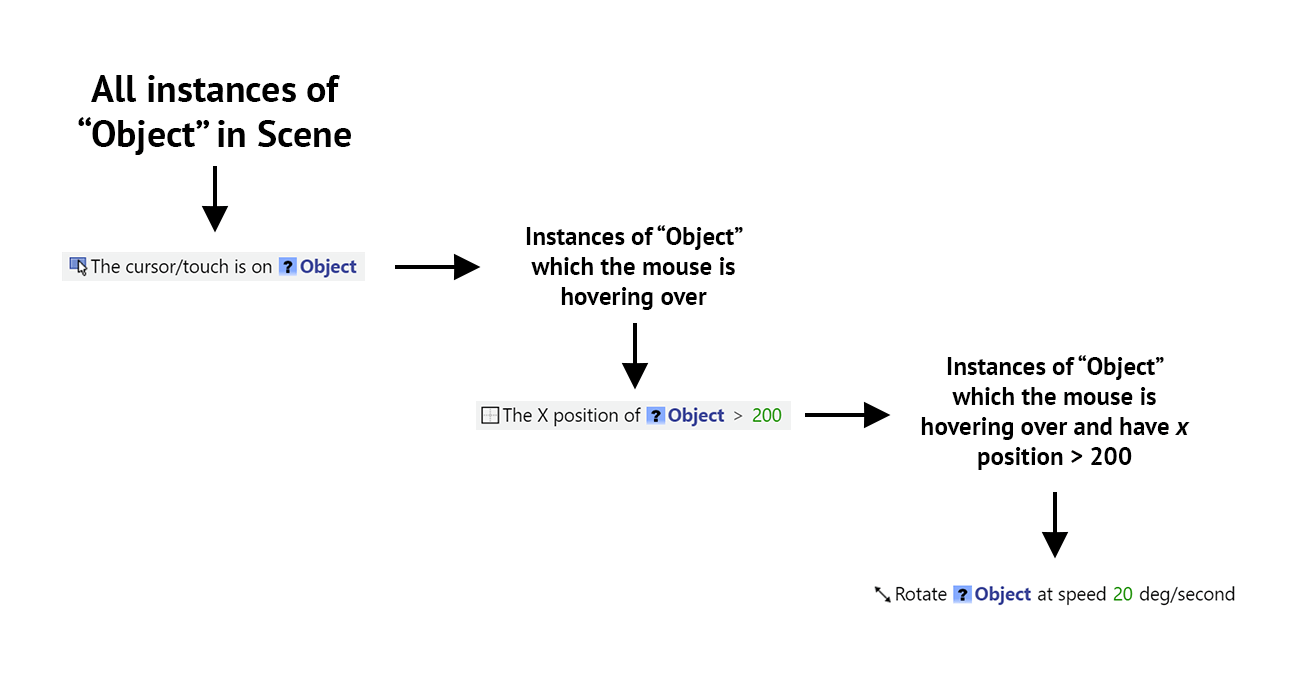
By rule 2 and 3, the first condition will pick only the object's instances that are being hovered over by the mouse. The second condition then filters the picked objects list furthermore by only keeping picked those with an x position greater than 200.
Ultimately, only the object(s) which are hovered by the mouse and have x position greater than 200 will be rotated, as stated by rule 1; all other objects will not be rotated.
Here is a chart demonstrating this:
Example 3: Pick all instances
Consider the following example:

First, by rule (2), only the instances of "Object" that are being hovered by the mouse will be picked. Then, instead of working with the picked objects lists, the special exception that is "Pick all objects" will pick back all the instances on the scene.
The effect of this is that when any Object is hovered, all of the objects will rotate. Contrast this with Example 2, where only the hovered object have been rotated.